
Gmail και Drive, νέος τρόπος αποστολής αρχείων
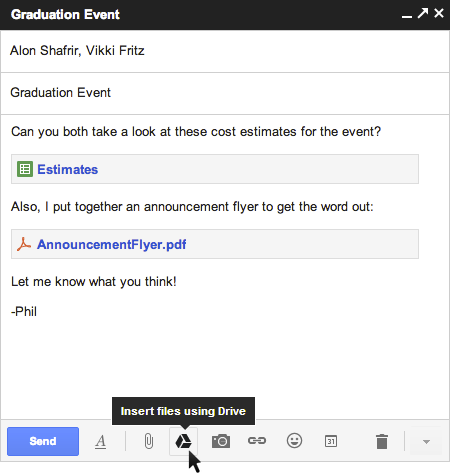
Have you ever tried to attach a file to an email only to find out it's too large to send? Now with Drive, you can insert files up to 10GB
-- 400 times larger than what you can send as a traditional attachment.
Also, because you’re sending a file stored in the cloud, all your
recipients will have access to the same, most-up-to-date version.
Like a smart assistant, Gmail will also double-check that your
recipients all have access to any files you’re sending. This works like
Gmail’s forgotten attachment detector:
whenever you send a file from Drive that isn’t shared with everyone,
you’ll be prompted with the option to change the file’s sharing settings
without leaving your email. It’ll even work with Drive links pasted
directly into emails.
So whether it’s photos from your recent camping trip, video footage from your brother’s wedding, or a presentation to your boss, all your stuff is easy to find and easy to share with Drive and Gmail. To get started, just click on the Drive icon while you're composing a message. Note that this feature is rolling out over the next few days and is only available with Gmail's new compose experience, so you'll need to opt-in if you haven't already.
Μείνε ενημερωμένος
Εβδομαδιαία ενημέρωση για εκδηλώσεις, νέα και πολιτιστικά δρώμενα της Κρήτης.